 Skip to content
Who is this guide for?
For new and existing players who want to know what each item on the 13L Game Mine page does.
Quick facts
| Item | Details |
|---|---|
| Where | Mine tab, bottom right |
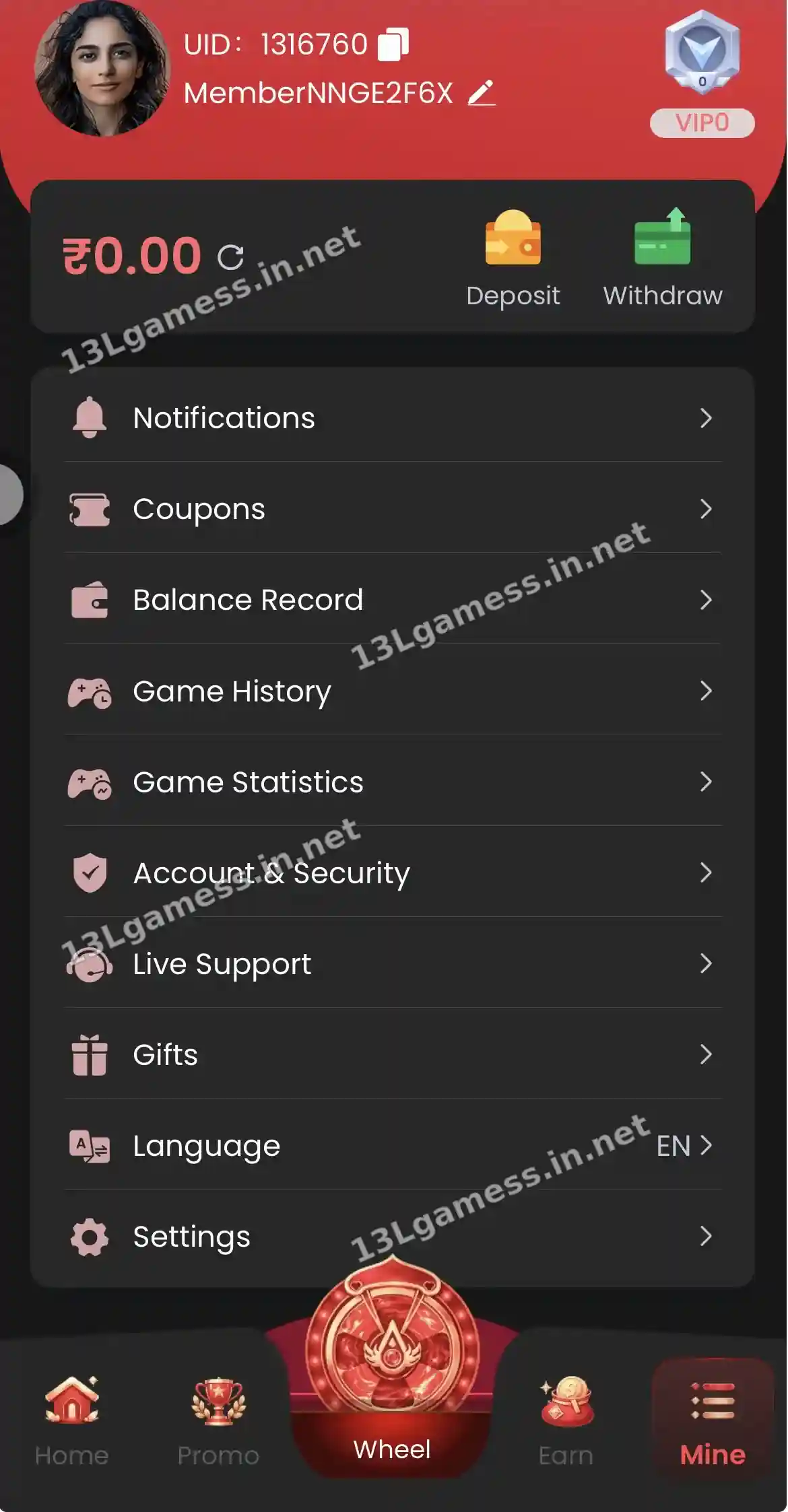
| Identity | Profile name, UID and VIP level (VIP0 for new accounts) |
| Money | Balance with Deposit and Withdraw buttons |
| Records | Balance Record, Game History, Game Statistics |
| Help | Live Support |
| Rewards | Coupons and Gifts |
Ready to open 13L Game?
These buttons open the 13L Game site and may be affiliate links. We are not the operator. 18+ only.
Step by step
- Tap Mine at the bottom of the screen.
- Copy your UID from the top — support uses it.
- Check your VIP level.
- Open Balance Record to see every transaction.
- Open Account & Security to review your password and details.
- Set your preferred language under Language.
Dashboard orientation
The screen shows a profile area, balance, deposit and withdrawal shortcuts followed by notification, coupon, balance record, game history, game statistics, account security, live support, gifts, language and settings entries.
Start with security
Confirm the phone number and profile identifiers belong to you. Set a unique password, keep the registered phone active and review any security or linked-account options before transacting.
Use records as your audit trail
Balance and game-history areas can help compare deposits, gameplay and withdrawals. Capture reference numbers rather than relying on the headline balance alone. If a record looks unfamiliar, stop and document it promptly.
Change details cautiously
Bank, UPI, password and language changes can affect access or withdrawals. Verify the requested field and save confirmation. Never let an unknown person operate the account through screen sharing.
Common problems and fixes
| Problem | Fix |
|---|---|
| Balance looks wrong | Tap the refresh icon, then check Balance Record |
| Cannot find a bonus | Check Coupons and Gifts |
| Need help | Live Support on the Mine page |
Frequently asked questions
Where can I check activity?
The dashboard includes balance record, game history and game statistics entries.
Does the displayed balance equal withdrawable money?
Not necessarily. Withdrawable balance, promotion conditions and account checks can differ from the main balance.
What is my 13L Game UID?
A unique account number at the top of the Mine page. It is safe to share with support.
How do I increase my VIP level?
VIP levels are tied to account activity. See the VIP rules in Promo.
Where are my 13L Game coupons?
Mine → Coupons.
Key takeaways
The short version of this page. For the full picture, start at our 13L Game app homepage.
- Mine shows UID, VIP level and balance.
- Records, support and settings all live here.
- Your UID is safe to share with support.
