 Skip to content
Who is this guide for?
This guide is for players cashing out for the first time and anyone whose withdrawal is slower than expected.
How to withdraw money from 13L Game (step by step)
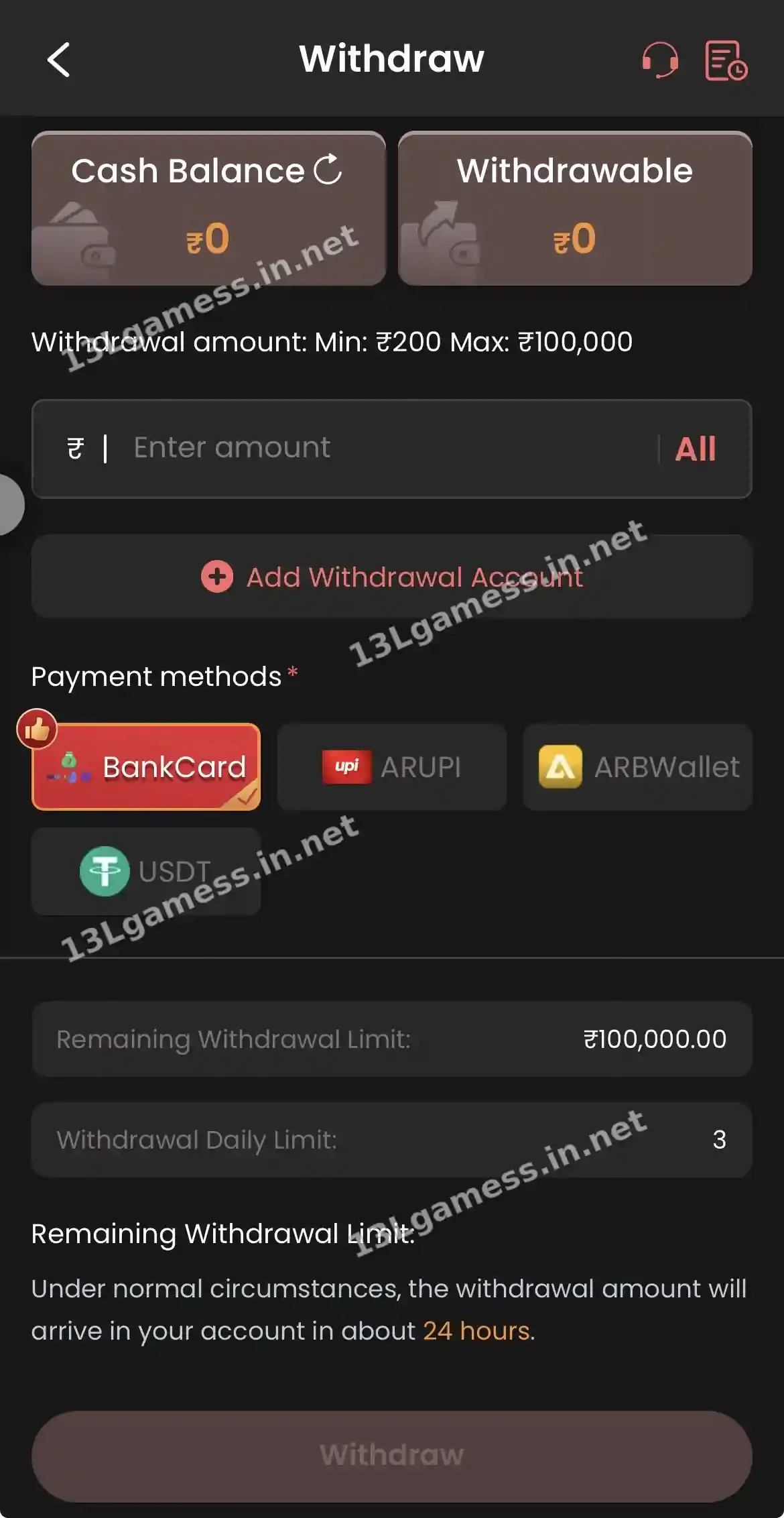
- Open Withdraw. Tap Withdraw on Home or Mine.
- Check Withdrawable. The top shows Cash Balance and Withdrawable. Only Withdrawable can be cashed out.
- Add a withdrawal account. Tap Add Withdrawal Account the first time and enter a bank card, UPI or USDT address in your own name.
- Choose the method. BankCard, ARUPI, ARBWallet or USDT.
- Enter the amount. Between ₹200 and ₹100,000, or tap All.
- Tap Withdraw. Note the time and check status in your records.
Ready to open 13L Game?
These buttons open the 13L Game site and may be affiliate links. We are not the operator. 18+ only.
13L Game withdrawal limits and time
| Item | What the withdraw screen shows |
|---|---|
| Minimum withdrawal | ₹200 |
| Maximum withdrawal | ₹100,000 (shown as Remaining Withdrawal Limit) |
| Withdrawals per day | 3 |
| Arrival time | About 24 hours under normal circumstances |
| Methods | BankCard, ARUPI, ARBWallet, USDT |
| What can be withdrawn | Withdrawable balance only |
Why “Withdrawable” is lower than your balance
Cash Balance includes all money in your account. Withdrawable is the part that has met the platform’s conditions — usually turnover, meaning you have bet a required amount on deposits and especially on bonus money. If you accepted a deposit bonus, the bonus and sometimes the deposit stay locked until turnover is complete. Check Promo rules and how the 13L Game wallet works.
Bank card vs UPI vs USDT
| Method | You need | Common mistake |
|---|---|---|
| Bank card | Account holder name, account number, IFSC | Wrong IFSC or name not matching the bank — fix via IFSC Modification |
| AR UPI | UPI ID in your name | Typo in the UPI handle — see change UPI account |
| AR B-Wallet | AR wallet account | Wallet not verified |
| USDT | Wallet address on the correct network | Wrong network — see USDT address |
Withdrawal pending or failed? Fixes
| Status / symptom | Likely reason | What to do |
|---|---|---|
| Withdraw button greyed out | Withdrawable is ₹0 or below ₹200 | Complete turnover or wait for winnings to settle |
| Pending beyond 24 hours | Review, bank delay or high volume | File Withdrawal problem in Self Service with your UID and time |
| Rejected / returned | Name mismatch, wrong IFSC or UPI | Correct details via IFSC Modification, Change bank name or Change UPI account |
| Daily limit reached | 3 withdrawals used today | Try again the next day |
| USDT not received | Network mismatch | Check the transaction hash and contact Live Support |
Full guide: 13L Game withdrawal problems.
Tips for faster withdrawals
- Add your withdrawal account before you need it, using your own name exactly as in the bank.
- Make a small test withdrawal (for example ₹200) before depositing large amounts.
- Keep the number of requests low — three per day is the maximum.
- Do not change bank or UPI details right before a big withdrawal; changes can trigger a review.
Frequently asked questions
What is the minimum withdrawal on 13L Game?
₹200. The maximum shown is ₹100,000.
How many times can I withdraw per day?
The withdraw screen shows a daily limit of 3.
How long does a 13L Game withdrawal take?
About 24 hours under normal circumstances, according to the app. Reviews or incorrect details can take longer.
Can I withdraw to UPI?
Yes. ARUPI is a listed method. Add a UPI ID in your own name first.
Why can I not withdraw my bonus?
Bonus money usually needs turnover first. Check the bonus rules in Promo.
Can I cancel a withdrawal?
We did not see a cancel button. Ask Live Support quickly if you made a mistake.
Key takeaways
The short version of this page. For the full picture, start at our 13L Game guide homepage.
- Withdraw from ₹200 up to ₹100,000, three times a day.
- Only the Withdrawable balance can be cashed out.
- Methods: BankCard, ARUPI, ARBWallet and USDT.
- The app states about 24 hours under normal circumstances.
- Nobody needs a fee to “release” your withdrawal.
