 Skip to content
Who is this guide for?
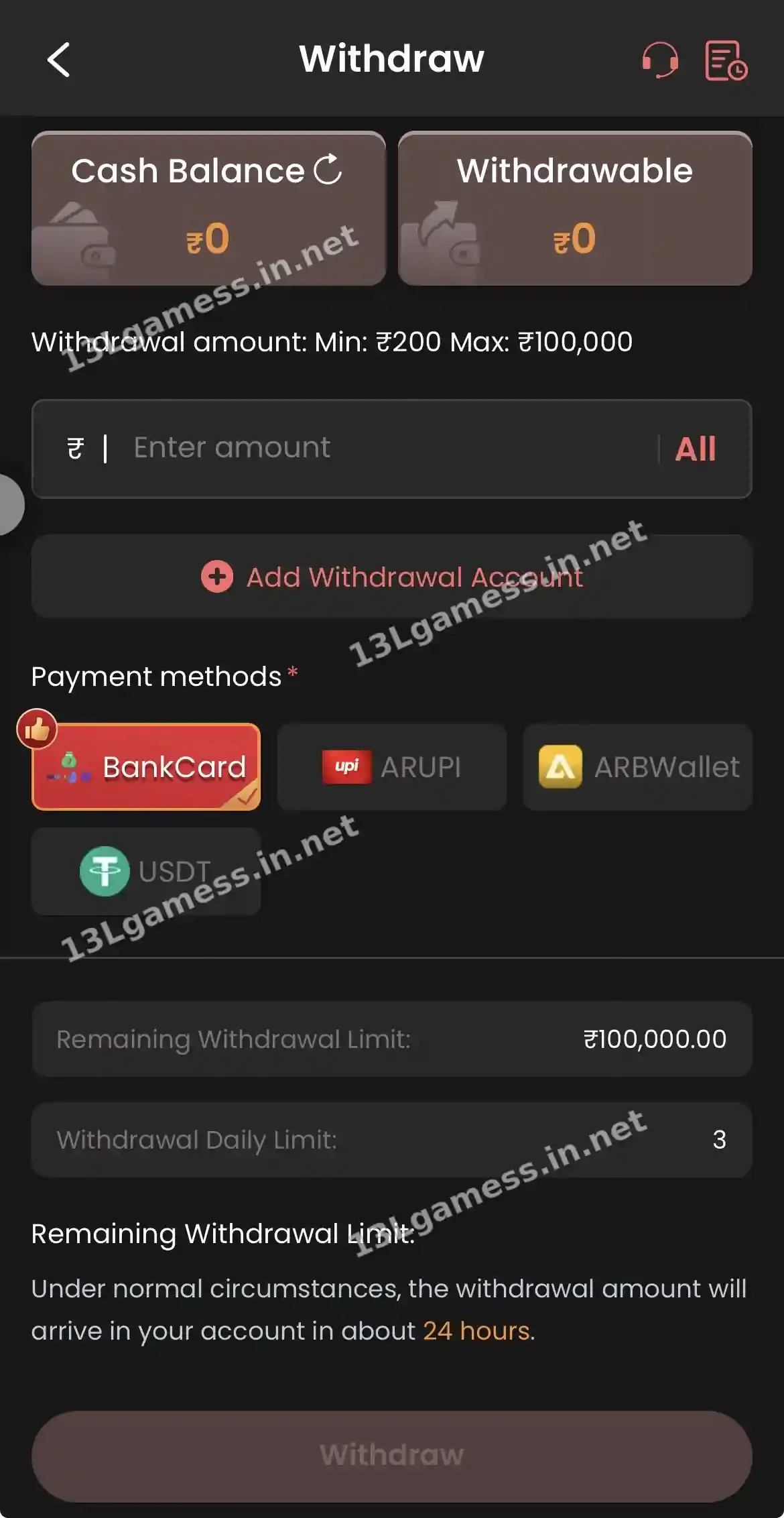
For players whose 13L Game withdrawal is pending, rejected or will not submit. New to the platform? Our 13LGame overview covers the basics first.
Quick facts
| Item | Details |
|---|---|
| Minimum / maximum | ₹200 / ₹100,000 |
| Daily limit | 3 withdrawals |
| Normal time | About 24 hours |
| Claim form | Self Service → Withdrawal problem |
| Detail fixes | IFSC Modification, Change bank name, Change UPI account |
Ready to open 13L Game?
These buttons open the 13L Game site and may be affiliate links. We are not the operator. 18+ only.
Step by step
- Confirm the amount was within ₹200 – ₹100,000.
- Check that Withdrawable (not Cash Balance) covered it.
- Verify your bank name, account number and IFSC or UPI ID.
- Count today’s requests — the limit is 3.
- Wait the stated 24 hours.
- File Withdrawal problem in Self Service and track with Progress Query.
Identify the status
Pending, processing, rejected, completed and reversed require different actions. Record the exact label, submission time, amount, method and request ID before changing any linked details.
Review account matching
A bank-account name, IFSC, UPI identifier, wallet or crypto network mismatch can delay or reject a request. Compare the saved destination with an authoritative record and use the official modification flow when needed.
If marked completed but not received
Check the destination account statement and processing date, allowing for banking or network delays. Ask support for the payout reference, then provide that reference to the bank or wallet provider if appropriate.
Escalate without paying more
Use the Withdrawal Problem category and preserve the progress-query result. Do not transfer a “tax,” “unlock fee” or “security deposit” to a personal account.
Common problems and fixes
| Problem | Fix |
|---|---|
| Pending over 24 hours | File Withdrawal problem |
| Rejected | Correct IFSC / bank name / UPI, then retry |
| Button greyed out | Withdrawable below ₹200 or turnover not met |
| Asked to pay a fee | Scam — do not pay |
Frequently asked questions
Does the screenshot guarantee payment within 24 hours?
No. It says “about 24 hours” under normal circumstances, but that is not a guarantee and current wording may differ.
Should I cancel and resubmit repeatedly?
Not unless the verified interface instructs you to do so. Repeated requests can complicate records.
Why is my 13L Game withdrawal still pending?
Reviews, bank delays or incorrect details. Wait 24 hours, then file Withdrawal problem.
Will a failed withdrawal return to my balance?
Usually yes. Check Balance Record and ask Live Support if it does not.
Do I need to pay tax to withdraw?
Never pay anyone in a chat to release a withdrawal.
Key takeaways
- Check Withdrawable, turnover and bank details.
- Three withdrawals per day is the limit.
- Never pay a fee to release a payout.
