 Skip to content
Who is this guide for?
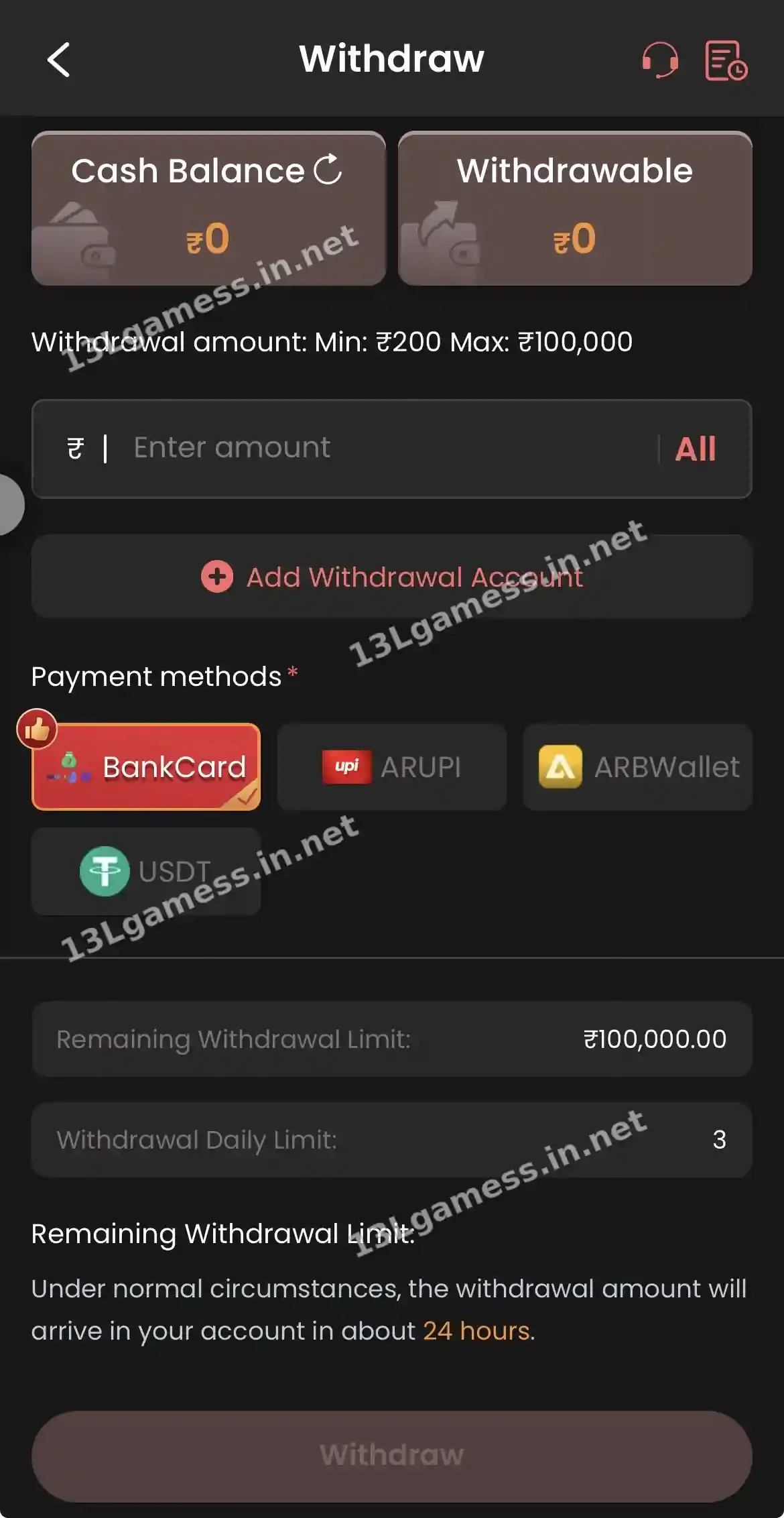
For players confused by Cash Balance vs Withdrawable, or setting up a payout account.
Quick facts
| Item | Details |
|---|---|
| Cash Balance | Everything in your account, including locked bonus money |
| Withdrawable | Money that can be cashed out now |
| Deposit range | ₹100 – ₹50,000 |
| Withdrawal range | ₹200 – ₹100,000, 3 per day |
| Withdrawal methods | BankCard, ARUPI, ARBWallet, USDT |
| Arrival | About 24 hours |
Ready to open 13L Game?
These buttons open the 13L Game site and may be affiliate links. We are not the operator. 18+ only.
Step by step
- Open Deposit or Withdraw to see both balances.
- Tap the refresh icon next to Cash Balance.
- Tap Add Withdrawal Account and add details in your own name.
- Read bonus turnover rules before accepting offers.
- Check Balance Record after every deposit and withdrawal.
Two balances may mean different things
The withdrawal screen shows Cash Balance and Withdrawable as separate cards. Promotional funds, unsettled entries or conditions may affect how much can actually be requested.
Before adding money
Read the current minimum, maximum, method, recipient and fees. Use a financial account you control and save the transaction reference. Never transfer solely because an agent says a timer is expiring.
Before requesting money out
Confirm bank name, account number and IFSC, or verify the token network and address for crypto. Review the amount and current limits on the final screen before submission.
Keep a simple ledger
Record deposits, withdrawals and game spending outside the platform. An independent ledger makes it easier to see total loss and prevents a promotional balance from being confused with personal funds.
Common problems and fixes
| Problem | Fix |
|---|---|
| Withdrawable is ₹0 | Complete bonus turnover or wait for settlement |
| Wrong bank details | IFSC Modification / Change bank name |
| Need to change UPI | Self Service → Change UPI account |
Frequently asked questions
Why is withdrawable lower than cash balance?
Possible reasons include unsettled activity, bonus conditions or account rules. Check the current terms and records.
Can support ask for my UPI PIN?
No. A UPI PIN or banking OTP should never be disclosed.
What is the difference between Cash Balance and Withdrawable?
Cash Balance is everything; Withdrawable is the part that has met the conditions to be cashed out.
Can I hold USDT in the 13L Game wallet?
USDT is a deposit and withdrawal method; balances are shown in rupees.
Is my wallet balance safe if I uninstall the app?
Yes. Balances are stored on the server, not on your phone.
Key takeaways
The short version of this page. For the full picture, start at our 13LGame homepage.
- Withdrawable is the only cash-out balance.
- Add payout details in your own name early.
- Bonuses can lock part of your balance.
