 Skip to content
Who is this guide for?
For players browsing the 13L Game lobby and trying to find a game type or provider. New to the platform? Our 13L Game guide overview covers the basics first.
Quick facts
| Item | Details |
|---|---|
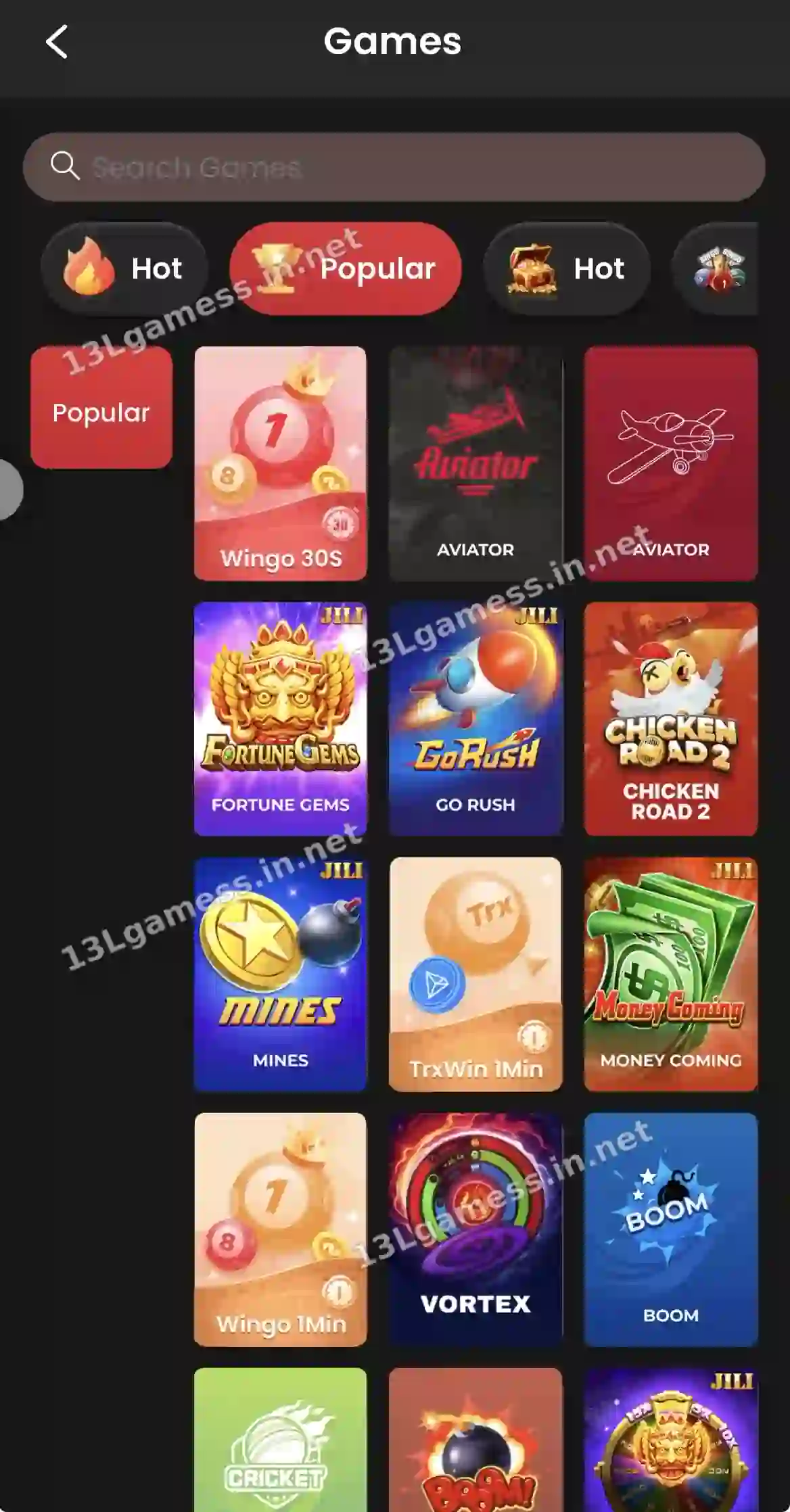
| Popular / Hot | Wingo 30S, Aviator, Fortune Gems, Go Rush, Mines |
| Lottery | Wingo 30S, Wingo 1Min, TrxWin 1Min |
| Slots | JILI, Topbet, JDB, PG, INOUT, CQ9, BGaming, 9G |
| Crash | Aviator, Boom, Limbo, Chicken Road 2 |
| Fish | Jackpot Fishing, Royal Fishing, Mega Fishing |
| Casino / Poker | Evo, DG, MG, Sexy, WM; 3 Patti, Rummy, Andar Bahar |
| Sports | ARBET, SABA, CMD |
Ready to open 13L Game?
These buttons open the 13L Game site and may be affiliate links. We are not the operator. 18+ only.
Step by step
- Open Games from Home.
- Swipe the category bar.
- Pick a provider in the left column where shown.
- Or type the game name in Search Games.
- Open the game’s rules before betting.
Use category tabs to narrow the lobby
The lobby contains many tiles and provider-style labels. Select a category, then read the individual game rules rather than assuming every tile follows the same timing, payout or result format.
What category labels do not prove
A “hot” or “popular” badge is promotional navigation, not evidence of fairness, profitability or low risk. Position on the screen can be influenced by marketing or availability.
Before opening a game
Check the provider name, rule page, minimum entry, result calculation and whether a demonstration mode exists. Do not rely on a title or thumbnail alone.
Keep sessions controlled
Choose a time and loss limit before browsing. Large catalogues encourage switching games after losses, but changing categories does not recover money or improve future odds.
Common problems and fixes
| Problem | Fix |
|---|---|
| Category empty | Refresh or switch network |
| Game will not open | Update the app; try the website |
| Cannot find a title | Search by name |
Frequently asked questions
Are all screenshot categories always available?
No. Providers, regions, maintenance and platform updates can change the catalogue.
Does “popular” mean safer?
No. It is a navigation label and does not establish risk, fairness or suitability.
What does Hot mean on 13L Game?
A label for currently popular games. It does not change the odds.
Are there fishing games on 13L Game?
Yes, in the Fish category.
Can I filter by provider?
Yes, in Slots, Casino and Poker.
Key takeaways
- Nine categories sit in the top bar.
- Providers are listed on the left in some tabs.
- Search Games finds a title by name.
